Notion Astrology Planner, Tarot Journal: A Design Review
Thank you for clicking on my "Notion Astrology Planner." If you are anything like me, you treat your spiritual practice with the same rigor and aesthetic care as your business planning. There is a distinct disconnect when you have a beautifully designed brand but your internal planning systems look like a chaotic spreadsheet. This is where the Notion Astrology Planner, Tarot Journal steps in. It is not just a digital notebook; it is a strategic design asset that bridges the gap between intuitive work and professional organization. Designed with minimalist, chic fonts and a distraction-free interface, this template transforms your daily planning into a ritual.
The Visual Identity: Minimalist Functionality
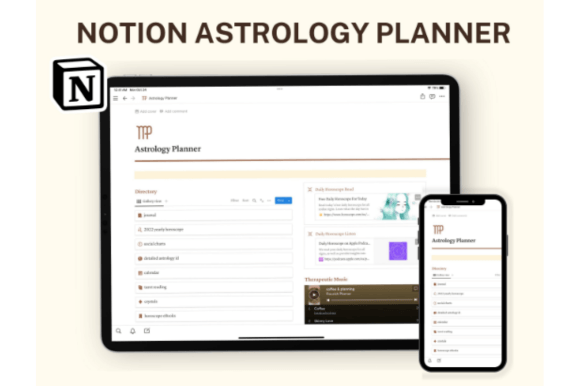
As a designer and brand strategist, I am acutely aware of how visual noise affects productivity. The Notion Astrology Planner avoids the "digital scrapbook" aesthetic that clutters so many spiritual templates. Instead, it adopts a modern typography approach. The font choices are clean, sans-serif, and highly legible, prioritizing readability over decoration. This creates a sense of calm authority. When you open your dashboard, you aren't greeted with chaos; you are greeted with a clear hierarchy. The color coordination is subtle but effective, guiding your eye to specific sections—like the Daily Horoscope or the Tarot Reading Template—without overwhelming the senses. It is a premium font experience built entirely within Notion’s native capabilities, ensuring that it loads fast and functions seamlessly across devices.
Bridging Intuition and Editorial Design
Why does a tool like this matter for entrepreneurs, marketers, and content creators? Because consistency is the bedrock of a strong brand identity. We often focus on external consistency—our logo design, our web design, our social media graphics—but neglect the systems that fuel our creativity. The Notion Astrology Planner, Tarot Journal acts as an internal editorial design tool. It organizes the chaotic flow of ideas, horoscope insights, and tarot readings into a structured format.
Consider the "Social Charts" or "Detailed Astrology ID" sections included in the package. For a content creator or blogger, this data is not just personal; it is strategic. Knowing your planetary transits can inform your marketing calendar. By housing this data within a sleek, organized Notion template, you are treating your astrological data with the same professionalism you would a market analysis report. It elevates the perception of your practice from a casual hobby to a serious business component.
Practical Applications for Creative Professionals
The versatility of this planner extends well beyond simple journaling. The package includes multiple page templates, making it a robust design asset for various workflows. Here is how different professionals can leverage this system:
- For Designers and Artists: Use the "Crystal Horoscope" and "Natal Chart Details" sections to track creative energy cycles. Align your deep work sessions with your astrological flow rather than fighting against it.
- For Marketers and Publishers: The "2022 Yearly Horoscope" and calendar templates allow you to plan campaigns around significant cosmic shifts. It provides a unique angle for your content strategy.
- For Brand Strategists: Utilize the journaling features to document intuitive hits regarding client work. The distraction-free environment ensures that your notes remain focused and actionable.
The inclusion of a "Light Mode" dashboard is a thoughtful design choice. While many productivity apps lean into dark mode, light mode often provides better contrast for extended reading and writing sessions, particularly when reviewing detailed horoscopes or drafting thank you notes for clients.
Customization and Typography Hierarchy
One of the strongest features of the Notion Astrology Planner is its full customizability. In the world of graphic design, we know that a template is only as good as its ability to adapt to the user's voice. This planner allows you to add custom sections, rename headers, and adjust the layout to fit your specific needs.
The typography hierarchy used within the template is worth noting. It utilizes weight and size to distinguish between headers, sub-headers, and body text. This is a fundamental principle of modern typography—creating a visual roadmap for the reader. Whether you are logging a Tarot Reading or reviewing a Daily Horoscope, the text hierarchy ensures you can scan information quickly. You can easily pair this internal system with your external brand fonts. While the Notion template uses system fonts for speed, the aesthetic mimics the clean lines of popular sans-serif display fonts used in high-end editorial design.
Elevating Your Tarot Practice
The Tarot Reading Template included in the set is a standout feature. Many tarot journals are overly ornate, making it difficult to focus on the interpretation. This template strips back the excess, offering a structured format for recording card pulls, spreads, and personal insights. For the spiritual entrepreneur, this creates a searchable database of readings. Over time, this becomes a valuable archive of your intuitive work, allowing you to spot patterns and themes that you might otherwise miss in a paper notebook.
Conclusion
The Notion Astrology Planner, Tarot Journal is more than just a digital planner; it is a professional tool for the modern mystic. It proves that spiritual planning and business acumen are not mutually exclusive. By applying principles of minimalist design and strong visual hierarchy to your daily horoscope and tarot practice, you create a workspace that inspires clarity and action. It is an essential asset for anyone looking to bring a little more order—and a lot more style—to their cosmic journey.