Loop: A Social Media App Built on Seamless Design
Why Visual Clarity Matters More Than Ever
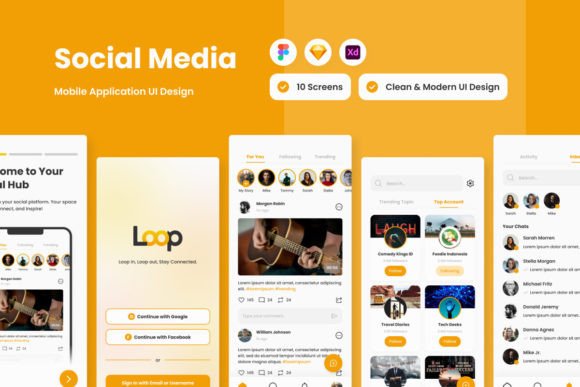
In the crowded space of social media, where countless apps compete for attention, the user experience often boils down to how intuitive and visually pleasing the interface feels. Loop - Social Media Mobile App enters this arena with a clear focus on design quality. Its core promise isn't just about connecting people; it's about making those connections through a thoughtfully crafted visual environment. For designers, entrepreneurs, and content creators evaluating tools, the underlying design system of an app like Loop offers valuable lessons in modern digital interface design.
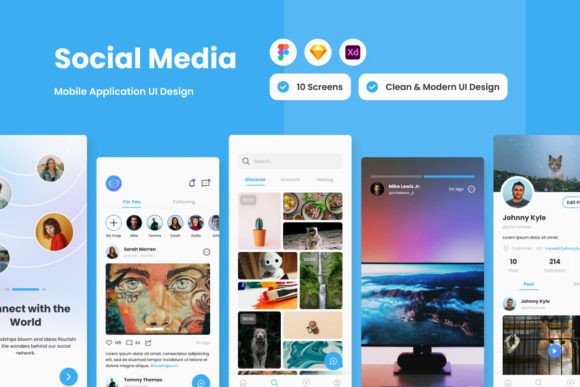
The app’s visual identity is built on clarity and organization. The "high-quality screen layout design" isn't just a marketing phrase—it translates to balanced compositions, ample white space, and a logical flow that guides the user's eye. This approach directly supports its function as a "dynamic world where stories unfold." Whether you're scrolling through a feed of looping videos or engaging in a threaded conversation, the layout ensures content remains the hero, not the interface elements fighting for your attention.
Anatomy of a Well-Organized Design System
Loop’s design files, available in formats like .fig, .xd, .sketch, and .psd, reveal a professional-grade foundation. The "layers are well organized and neat" is a critical detail for any designer or developer looking to learn from or adapt the system. A disorganized file can turn a beautiful mockup into a nightmare for implementation. Here, the structure likely follows a component-based approach, where buttons, navigation bars, and post cards are built as reusable symbols or components. This isn't just convenient; it's a practical example of scalable design thinking.
The use of "global text and color styles" is another standout feature. In practice, this means a designer can change the primary brand color or the default body font once, and the update ripples through every screen in the file. For entrepreneurs creating a startup or marketers managing a brand, this enforces consistency. Your brand identity remains coherent whether a user is viewing your profile, reading a long-form post, or watching a story. The included "open source fonts" also highlight a practical, cost-effective approach to typography, ensuring the design is both accessible and legally safe for commercial projects.
From App Interface to Broader Creative Inspiration
While Loop is a social media mobile app, its design language can inspire projects far beyond a phone screen. The clean, modern typography and organized layout principles are directly transferable. Consider these applications:
- Social Media Graphics & Web Design: The app's visual rhythm—how it spaces text, sizes images, and uses color—can inform the design of Instagram carousels, Facebook ad templates, or a minimalist website homepage. The goal is the same: clear communication with visual appeal.
- Brand Identity & Editorial Design: The system's consistency is a masterclass in building a recognizable brand. A small business owner could study how Loop maintains its personality across different functions and apply that discipline to their own logo design, packaging, or digital publications.
- Presentation & Marketing Collateral: The organized file structure is a template for creating professional pitch decks or brochures. Using its "design that is easy to adjust" philosophy, a marketer could quickly adapt the layout for different campaigns without starting from scratch.
The key takeaway isn't to copy the app, but to analyze why its design works. The "continuous stream of inspiration" comes from seeing how professional designers solve common problems: making information digestible, creating visual interest without clutter, and ensuring every element has a purpose.
Practical Guidance for Applying These Principles
If the design of Loop resonates with your project needs, here’s how to approach it methodically:
- Evaluate the Fit: Does your project require a clean, modern, and highly organized aesthetic? Loop’s style suits brands that value clarity, innovation, and user-centric design. It might be less suited for projects requiring a rustic, handwritten, or overly ornate display font style.
- Test Font Pairings: The included open source fonts likely include a sans-serif for body text and perhaps a complementary display font for headlines. Test these pairings in your own context. For example, pair the app’s primary sans-serif with a classic serif font for a more traditional editorial feel, or with a bold script font for high-impact logos.
- Leverage the Assets: Don’t just look at the screens. Dive into the organized layers. Study the spacing, the hierarchy of information, and the component structure. This is where the real value lies for a designer seeking to improve their own process or build a more robust design system.
- Check the Licensing: The files are provided for preview and learning. If you intend to use any specific graphical element, icon, or asset from the Loop files in a commercial product (like a client’s website or a product for sale), you must source or create your own assets that match the style. The design principles are universal; the specific copyrighted assets are not.
Ultimately, Loop - Social Media Mobile App serves as a compelling case study in how thoughtful design can create a platform for engagement. Its strength lies not in flashy effects, but in the disciplined execution of layout, typography, and system organization—principles that any creative professional can apply to elevate their next project, whether it's a new app, a brand refresh, or a marketing campaign.